Data Enrichment Checklist for Sales Teams
A practical checklist to clean, enrich, validate, and automate B2B sales data—covering CRM prep, vendor selection, bulk processing, and ongoing maintenance.

Data enrichment transforms basic contact information like names or emails into complete profiles with details like job titles, company size, and revenue. This helps sales teams work with accurate, actionable data. Poor-quality data costs businesses billions annually, wastes sales reps' time, and decays quickly. Enriched data, on the other hand, boosts lead quality, conversion rates, and revenue.
Key Steps to Effective Data Enrichment:
- Clean Your CRM First: Audit for duplicates, outdated records, and formatting issues.
- Standardize Fields: Ensure consistency in names, emails, and phone formats.
- Identify Data Gaps: Focus on fields critical to your sales process, like verified emails or company revenue.
- Choose the Right Tools: Look for accuracy, CRM integration, compliance, and bulk processing capabilities.
- Test and Validate: Start with a small sample, verify results, then scale up.
- Automate Updates: Use real-time triggers and webhook integrations to keep data fresh.
- Maintain Regularly: Conduct quarterly refreshes and monthly audits to prevent decay.
Quick Tip: Tools like Enrichfox.ai and Apollo.io offer affordable, scalable options for enrichment. Start small with 1,000 records to test accuracy before committing to large-scale efforts. Regular updates and validation ensure your data stays reliable over time.
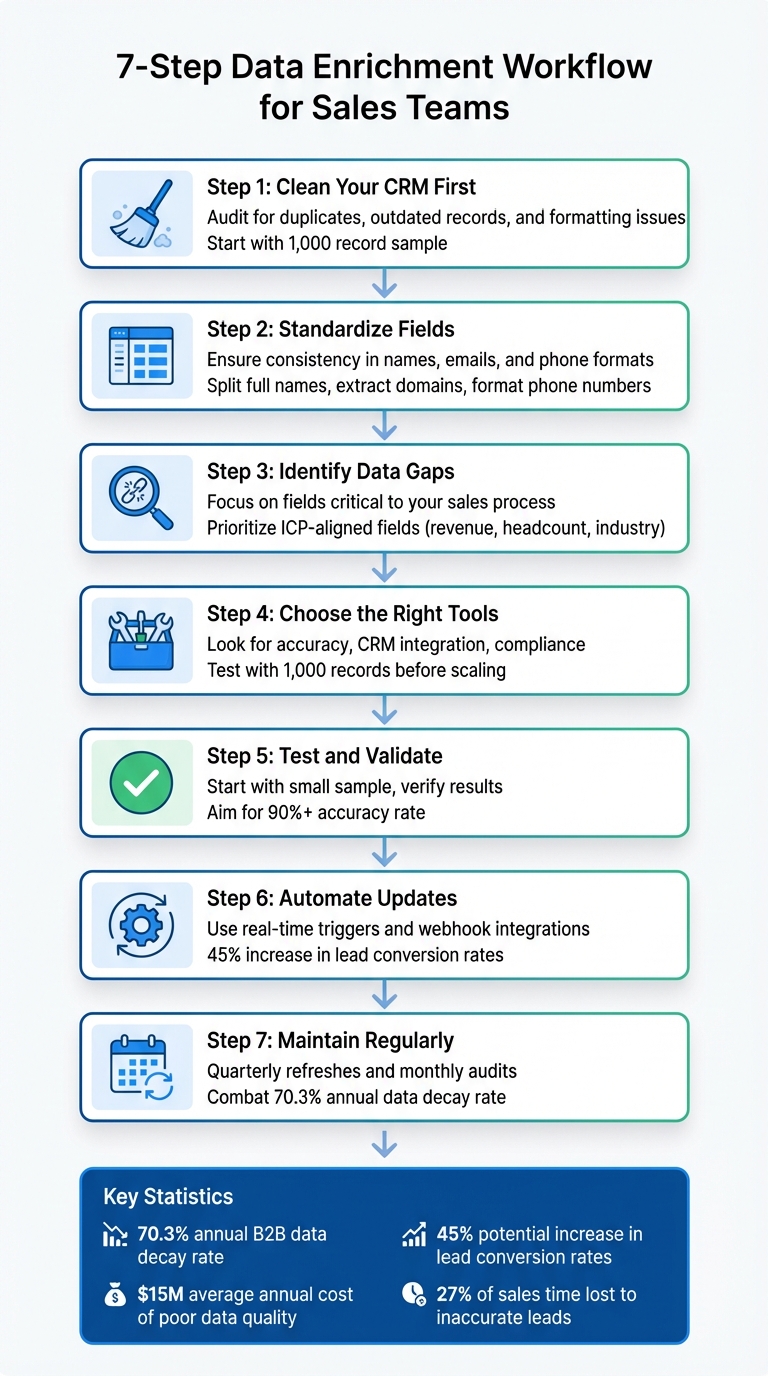
7-Step Data Enrichment Workflow for Sales Teams
How to Build and Enrich B2B Lead Lists For Free
Preparation Steps Before Enrichment
Before diving into data enrichment, it's crucial to clean up your existing data. Sara McNamara, Director of RevOps at Hyperscayle, explains it perfectly:
"Before you even think about vendors or new data sets, start by auditing your current data. It's like cleaning out the garage before you buy new shelves - if you don't clean first, you'll just add more to your existing mess".
Simply put, enrichment tools won't fix messy data. If your CRM is packed with outdated records, personal email addresses, or inconsistent formatting, automation will only amplify these problems. Taking the time to prepare your data properly not only saves enrichment credits and improves match rates with third-party providers but also boosts your sales team's confidence in the CRM. Start by auditing your CRM to pinpoint any errors or gaps.
Audit Your CRM Data
Begin by reviewing a sample of 1,000 records to identify common issues like missing, duplicate, or outdated entries. Filter out personal email domains such as Gmail, Yahoo, or Hotmail, and remove leads that haven't engaged in over a year. Use unique identifiers - like email addresses, LinkedIn URLs, or company domains - to prevent duplication .
When exporting and cleaning data, always keep CRM Record IDs (e.g., Contact ID or Account ID) intact. This ensures the cleaned data can be correctly reimported into your system without disrupting existing records.
Standardize Contact Fields
Consistency in field formatting is key to accurate enrichment. Habib Benabdeslam from Datablist emphasizes this point:
"When you structure CRM data, RevOps & GTM teams see better what's working and what's not".
For example, split full names into separate first and last name fields using a name parser. Extract email domains (like "acme.com" from "[email protected]") to create unique account identifiers.
Phone numbers should also follow a standardized format. Include a country column when processing bulk data to ensure tools apply the correct international format - like +1 for the U.S. or +44 for the U.K. - which can improve connection rates for sales dialers. To prevent future errors, enforce field constraints in your CRM, such as allowing only numeric entries in phone fields.
Once your data is standardized, focus on identifying the gaps that limit your ability to target effectively.
Identify Data Gaps
Analyze your database to find fields that are consistently empty or contain insufficient data. Prioritize fields that align with your Ideal Customer Profile (ICP), such as company revenue, headcount, industry, or technology stack. The specific data you need will depend on your sales cycle: firmographic data might be critical for lead scoring, while outreach efforts benefit from verified emails and direct-dial numbers.
Also, look for buying signals that suggest immediate intent - like recent funding announcements, hiring trends, or technology adoption. Tailor your focus to the data that matters most at each stage. For example, territory mapping requires accurate location details, while personalized outreach benefits from knowing job functions and seniority levels.
To maintain data quality, conduct monthly audits and a more comprehensive review annually. Test a sample of 1,000 records with different enrichment vendors to determine which one best addresses your specific needs before committing to larger-scale enrichment efforts.
Selecting the Right Data Enrichment Tools
After cleaning and organizing your data, the next step is to pick the right enrichment platform. With B2B data decaying at a rate of 70.3% annually and costing businesses $15 million each year, choosing the right tool can make a huge difference - potentially increasing lead conversion rates by up to 45%. This decision is key to getting the best results from your sales efforts.
Key Features to Look For
Data accuracy should be at the top of your list. Look for platforms that validate information against 150+ sources, standardize data, and include human verification. For instance, Cognism boasts a 98% match rate for human-verified contacts, compared to just 72% for some competitors. Email validation is especially critical since sales reps already lose about 27% of their selling time chasing inaccurate leads.
Integration capabilities are another must-have. Your tool should seamlessly integrate with CRMs like Salesforce and HubSpot, support bidirectional data syncing, and offer solid APIs for custom workflows. Apollo, for example, integrates contacts, leads, and accounts directly into your CRM without requiring manual updates.
Compliance and security are vital, particularly if you’re working in regions with strict data protection laws or handling sensitive customer information. Ensure your chosen tool complies with standards such as GDPR, CCPA, SOC 2 Type II, or CASA Tier 3. Poor-quality data can lead B2B marketers to target the wrong decision-makers 86% of the time, so compliance not only protects your data but also your brand’s reputation.
Finally, consider scalability and bulk processing. Can the platform handle large volumes of data without slowing down? Apollo processes around 100,000 leads daily, while Clay’s waterfall enrichment taps into 75+ data providers to ensure broad coverage at a lower cost.
Tool Comparison Table
| Tool | Accuracy | Pricing (Starting) | Key Integrations | Bulk Processing |
|---|---|---|---|---|
| Enrichfox.ai | 99% email validation | $0.00025 per verified email, $0.05 per found email, $0.03 per phone | API/webhook, CSV export | Unlimited bulk enrichment |
| Apollo.io | 4.7/5 rating (9,015 reviews) | $49/month | Salesforce, HubSpot, native CRM sync | 100,000 leads daily |
| Clay | High (multi-source) | Credit-based with rollover | 75+ providers, CRM integrations | Millions of records |
| ZoomInfo | Variable (massive database) | Custom (enterprise pricing) | Salesforce, HubSpot, Outreach | Enterprise-scale |
| Cognism | 98% verified match rate | Custom pricing | Salesforce, Outreach, team-wide | Scalable for teams |
| Leadmagic | 95%+ (mobile focus) | Not disclosed | CRM syncing | Not specified |
Enrichfox.ai stands out for its pay-as-you-go pricing model, charging just $0.00025 per verified email. This makes it an excellent choice for teams looking for flexibility without being tied to monthly subscriptions. Additionally, it validates phone numbers and offers real-time API integrations, making it suitable for both small sales teams and larger operations that require high-volume processing without performance issues.
Core Data Enrichment Workflow Checklist
After choosing your enrichment platform, start small with test runs before scaling up and automating your processes. This step-by-step approach allows you to identify any issues early and ensures your data is reliable before diving into large-scale operations.
Test with Sample Lead Lists
Kick things off by uploading a small CRM lead list to assess the tool's accuracy and compatibility. Double-check the results manually - verify details like email addresses, job titles, and company information. To ensure you're picking the best platform, run the same sample through two or three different tools. This comparison will help you identify which one provides the most accurate, up-to-date profiles and integrates smoothly with your CRM or outreach tools.
Pay attention to confidence scores (often color-coded as Green/Yellow/Red) to differentiate between verified data and less reliable matches. Once you're satisfied with the test results, you can move on to bulk enrichment.
Run Bulk Enrichment
After confirming the tool's reliability with sample data, it's time to process larger datasets. You have three main options here:
- CSV enrichment for one-time updates.
- CRM enrichment to keep your database dynamic and always current.
- API enrichment for custom systems and large-scale operations.
For cost-effective bulk processing, consider platforms like Enrichfox.ai, which offers unlimited bulk enrichment at just $0.00025 per verified email. It also includes automated error-checking, so you can handle high volumes without worrying about subscription limits. To improve match rates, use waterfall enrichment, which sequentially queries over 20 data sources until a verified match is found. For email validation, prioritize tools with triple verification and catch-all detection to reduce bounce rates.
Since B2B data decays at a rate of about 2.1% per month (or 22.5% annually), schedule quarterly updates to keep your data fresh. After bulk processing, set up systems to ensure your data stays current with continuous updates.
Enable Real-Time Triggers
Real-time triggers are a game-changer for keeping your data up to date as changes happen. Set up event-based triggers to catch signals like job title updates, company funding announcements, or changes in technology stacks. For example, you can configure your CRM to automatically update contact roles whenever they change.
Integrate webhook triggers to connect your enrichment tool with outreach platforms, ensuring enriched leads are added to targeted email sequences automatically. Imagine this: if a prospect switches from WooCommerce to Shopify Plus, your team gets an instant alert, allowing you to send a perfectly timed message.
To avoid data misalignment or duplication, carefully map enriched fields to your CRM's internal data structure. You can even use website intent signals to trigger enrichment for anonymous visitors, turning web traffic into actionable buyer data. Companies using real-time enrichment strategies have reported a 45% boost in lead conversion rates.
"Apollo enriches everything we have: contacts, leads, accounts...And we don't really have to touch it, it just works."
– Mark Turner, VP of Revenue Operations, Built In
Validation and Maintenance of Enriched Data
After enriching your data, the real challenge begins - keeping it accurate and reliable. Data accuracy can degrade quickly, costing businesses billions of dollars worldwide. That’s why regular validation and maintenance are crucial to ensure your enriched data continues to deliver results and support your sales efforts.
Cross-Verify Data
Once enrichment is complete, take the time to cross-check your records. Use trusted sources like LinkedIn, public directories, and select third-party providers to verify your data. Set a high standard - aim for at least 90% accuracy when comparing your records against these sources. For high-value prospects, manual checks can catch errors that automated tools might overlook.
Automated workflows can streamline this process by continuously validating specific data types against reliable third-party databases. Keep an eye on real-time signals like bounced emails, job changes, or hiring activity. These indicators can alert you to outdated records and prompt immediate re-verification. Additionally, dips in email open or click-through rates are often a red flag that your data needs a thorough review.
Merge and Deduplicate Records
Duplicate records not only clutter your database but also waste resources. Use unique identifiers like email addresses, company domains, or LinkedIn profile URLs to locate and merge duplicates. When records have conflicting information - such as different job titles or notes - apply a "combine" rule to retain all valuable details. For example, merge notes by separating them with line breaks to preserve historical context. Always keep unique CRM Record IDs intact to ensure accurate reintegration.
When working with new lead lists, compare them against your existing CRM data. Remove duplicates from the new list to maintain historical records and avoid targeting the same contact twice. Deduplication is especially important before enrichment, as it helps conserve credits and ensures a cleaner database.
Schedule Regular Data Refreshes
Maintaining accuracy doesn’t stop with initial validation. While real-time enrichment is ideal, it’s not always practical. At a minimum, refresh key database segments quarterly - every 90 days. Research from Dunn and Bradstreet highlights the urgency: 120 company addresses and 75 phone numbers change every 30 minutes.
Here’s a suggested schedule to stay on top of data maintenance:
- Use real-time triggers to update records for job changes or funding events.
- Perform bulk refreshes every 30–90 days for active leads.
- Conduct deduplication audits monthly or before launching major campaigns.
- Schedule comprehensive data cleansing every six months to fix errors, update formatting, and remove outdated records.
These steps build on your earlier enrichment efforts, ensuring your workflow remains effective and your data stays reliable.
"Data enrichment isn't a one-and-done process. Instead, effective enrichment requires ongoing effort to ensure that collected data is relevant, accurate, and timely."
– Doug Bonderud, HubSpot
Automation and Integration for Sales Workflows
Once your data is validated and up-to-date, the next step is weaving enrichment into your daily sales operations. Automation takes the tediousness out of manual data entry, ensuring your team always works with accurate, current information. By letting enrichment run seamlessly in the background, your sales reps can focus on what truly matters - closing deals. Here's how automation can fit right into your CRM.
Set Up Webhook Triggers
Webhooks are like messengers that deliver enriched data to your CRM as soon as a specific event occurs. For example, when a new lead fills out a web form or an existing contact changes jobs, a webhook sends an HTTP POST request to your enrichment provider. The provider then appends verified details - like job titles, direct contact numbers, and company information - before syncing the updated record back to your CRM.
To get started, identify the events you want to trigger these updates. Common examples include new lead creation, account updates, or form submissions. Configure your CRM to send webhooks for these events, ensuring they fire at the right moments (like when a lead changes roles). Use HMAC with a shared secret to verify requests, manage duplicate events, and make sure updates only populate empty fields.
Integrate with Sales and Outreach Tools
Once webhooks are up and running, take it a step further by syncing your CRM with outreach tools. Bi-directional syncing ensures all platforms stay updated without the hassle of manual exports. Popular platforms like Salesforce, HubSpot, and Outreach allow for both real-time enrichment (instant updates when leads come in) and scheduled enrichment (bulk updates on a set schedule, like monthly or quarterly).
You can also implement "waterfall enrichment", where multiple data providers are queried in sequence. If your primary source doesn’t have a mobile number, for instance, the system automatically checks secondary or even tertiary providers until it finds what you need.
A simple workflow might involve collecting just an email address and letting the tool fill in the rest of the details. You can even set up rules so that when enrichment detects a job change, the contact is automatically added to a specific outreach sequence. Tools like EnrichFox make this process smooth with webhook integrations and API access, offering pay-per-result pricing starting as low as $0.05 for valid emails and $0.03 for valid phone numbers.
Monitor Post-Enrichment Metrics
Once your data flows are automated and validated, keeping track of the right metrics ensures your enriched data delivers real results. Start with data health metrics: monitor email bounce rates, lead coverage (the percentage of records with complete key fields), and data decay rates. Aim for over 90% coverage on critical fields and stay alert to bounce rates to identify outdated emails before they waste your team's time.
Next, evaluate workflow efficiency. Track how much manual research time each rep saves - automated updates can free up as much as 5 hours per week per rep. Also, check if enriched firmographic data is correctly routing leads to the right account executives. Finally, dive into sales engagement metrics, like email open rates, response rates, and meeting bookings, to see if better data is leading to better conversations.
Compare conversion rates and sales cycle lengths before and after enrichment to measure ROI. Keep in mind, inaccurate B2B data eats up nearly 23.7% of a sales rep's time - around 546 working hours annually. Even small improvements in data quality can translate to a big boost in productivity.
Conclusion
Integrating automation and validation into your sales workflows is just the beginning - data enrichment is an ongoing process. It’s not something you check off once and forget about. With B2B data decaying at a staggering rate of 70.3% annually, keeping your sales data accurate and actionable requires consistent effort. The steps outlined earlier offer a clear path to tackle outdated records, save time, and turn incomplete leads into high-quality opportunities.
Consider this: enriched data has the potential to increase marketing ROI by 29% and improve customer retention by 36%. On the flip side, poor data quality costs businesses an average of $12.9 million annually. That’s a hefty price to pay for neglecting your data.
A practical starting point? Begin with 1,000 records. Measure bounce rates, assess coverage, and refine your approach before scaling up. Tools like EnrichFox, which seamlessly integrate with CRMs, can simplify and streamline the entire process, making it easier to maintain clean, enriched data.
FAQs
How do I prepare my CRM data for successful enrichment?
To get your CRM data ready for enrichment, you’ll want to start by making sure it’s clean, consistent, and complete. First, tackle duplicates by merging or removing redundant records. Then, standardize formats - whether it’s phone numbers (e.g., 555-123-4567), addresses, or dates (stick to MM/DD/YYYY). Pay special attention to key fields like names, emails, phone numbers, and company names, as these are critical for matching with external data sources.
Once your data is in shape, align your CRM fields with the enrichment provider’s schema to ensure everything matches up. Before rolling out updates to your live data, test the process in a staging environment to catch any issues. To keep your data accurate over time, consider connecting your CRM to enrichment tools through APIs for regular updates. This approach can help you get the most out of platforms like EnrichFox, Apollo, or ZoomInfo, while giving your sales team the accurate information they need to work more effectively.
What key features should I look for in a data enrichment tool for my sales team?
When selecting a data enrichment tool for your sales team, focus on features that enhance data reliability, simplify workflows, and work effortlessly with your current systems. Prioritize tools that deliver verified and updated contact details - like emails, phone numbers, and job titles - while also offering insights such as firmographics, technographics, and intent signals. Features like real-time updates and bulk enrichment options are critical for handling large contact lists efficiently.
Make sure the tool integrates with your CRM or APIs (like Salesforce or HubSpot) to automate processes and save valuable time. Look for additional features such as data deduplication, email and phone validation, and custom field enrichment for industry-specific data to further boost your sales strategy. Lastly, consider factors like pricing options, GDPR compliance, and AI-driven insights to ensure the tool is both budget-friendly and secure for your team.
How often should sales teams update and validate enriched contact data?
To keep your contact data accurate and dependable, it's a good idea to update and validate enriched data every quarter. However, if you're in a fast-paced industry or managing a high-volume sales operation, stepping up to a monthly update schedule can ensure your data remains current and actionable.
By routinely refreshing your data, you can boost lead quality, reduce errors, and improve sales performance. This way, your team can always rely on the most up-to-date information to drive better results.